Unlock Every Word: The Ultimate Tool for YouTube Caption Download
समर्पित उच्च गति IP, सुरक्षित ब्लॉकिंग से बचाव, व्यापार संचालन में कोई रुकावट नहीं!
🎯 🎁 100MB डायनामिक रेजिडेंशियल आईपी मुफ़्त पाएं, अभी आज़माएं - क्रेडिट कार्ड की आवश्यकता नहीं⚡ तत्काल पहुंच | 🔒 सुरक्षित कनेक्शन | 💰 हमेशा के लिए मुफ़्त
वैश्विक कवरेज
दुनिया भर के 200+ देशों और क्षेत्रों में IP संसाधन
बिजली की तेज़ रफ़्तार
अल्ट्रा-लो लेटेंसी, 99.9% कनेक्शन सफलता दर
सुरक्षित और निजी
आपके डेटा को पूरी तरह सुरक्षित रखने के लिए सैन्य-ग्रेड एन्क्रिप्शन
रूपरेखा
Have you ever been in one of these situations?
- You watched an incredible English lecture and wanted to study the script, but had no text version.
- You needed to create bilingual subtitles for a video, but manual transcription was too time-consuming.
- You wanted to quote a powerful statement from a video but couldn't find the exact wording.
- You needed to quickly grasp the key points of a long video but didn't have time to watch it all.
If you nodded to any of the above, then the tool we're introducing today—YouTube Caption Downloader—will be a game-changer for you!
What Is This Website and What Does It Do?
In a nutshell, YouTube Caption Downloader is a specialized and powerful online tool. It has one core mission: to help you quickly and freely download the full text of any YouTube video that has publicly available captions.
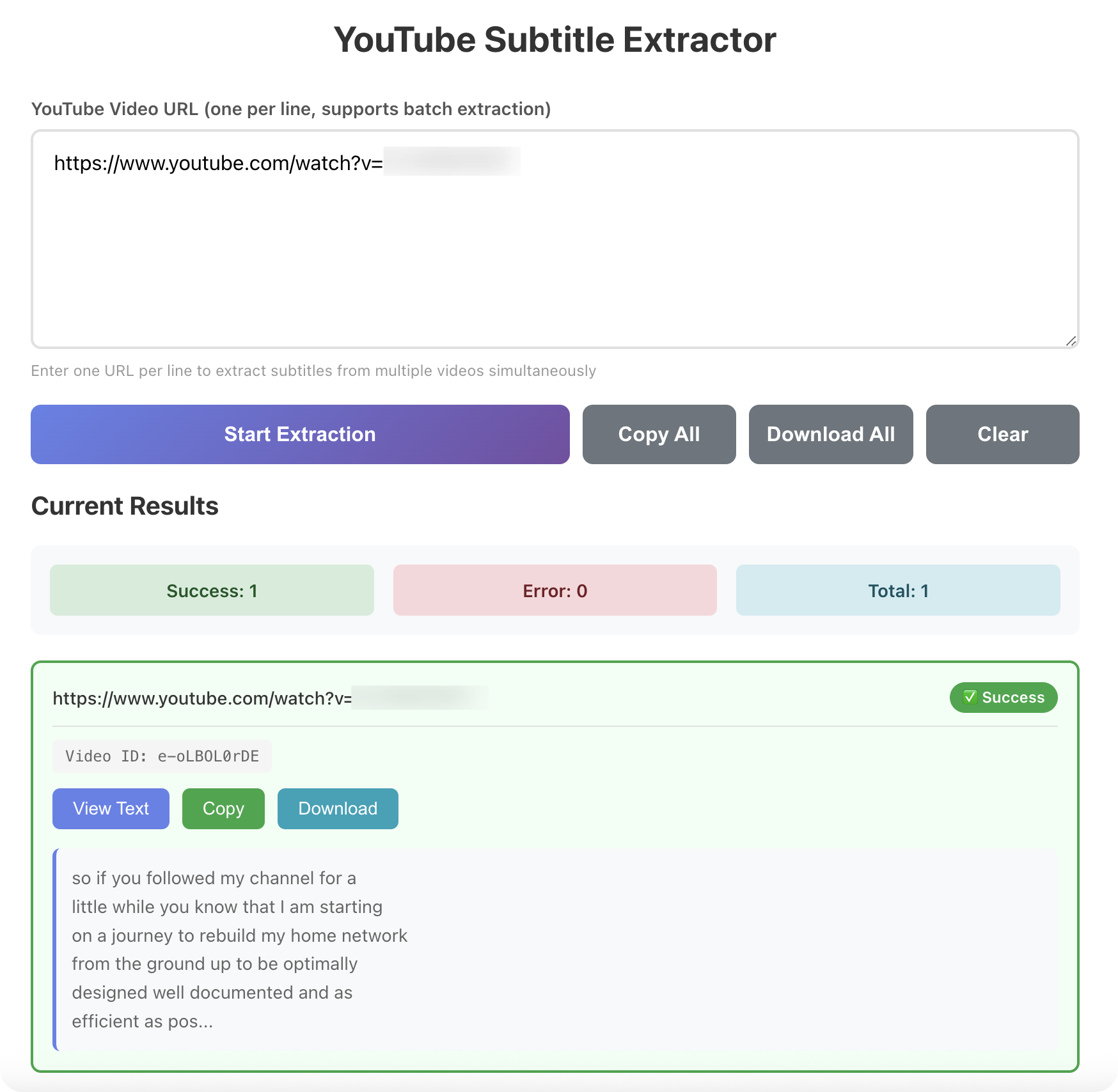
All you need to do is paste the URL of the YouTube video, click a button, and the website will automatically fetch and parse the video's closed captions (CC) or auto-generated subtitles, providing them for download in a plain text (.TXT) file. The entire process takes just seconds, happens entirely online, and requires no software installation or browser extensions.
Why I Highly Recommend It: 4 Core Strengths
- Ultra-Simple, 3-Step ProcessStep 1: Copy the video link from YouTube.Step 2: Go to YouTube Caption Downloader and paste the link into the input box.Step 3: Click the "Download" button and get your complete TXT file.No registration, no payment, no unnecessary steps. It truly is "ready to use."
- Accurate & Efficient, Clean OutputThe extraction is highly accurate because it relies entirely on the official subtitle source provided by YouTube. For videos with human-verified captions, the result is 100% precise. The tool provides the text as a clean, continuous paragraph, making it perfect for reading and further processing, saving you from the hassle of copying line-by-line from the YouTube player.
- Wide Range of Applications: An Efficiency PowerhouseFor Content Creators: Quickly get raw text for writing video summaries, repurposing content into articles, or using it as a reference for new scripts.For Language Learners: Download the subtitles of your favorite international creators to use as intensive reading or listening practice materials.For Researchers & Students: Easily extract key information and quotes from online courses, lectures, or documentaries to streamline your note-taking.For SEO & Marketers: Analyze the script structure and keywords of competitor videos to gain valuable industry insights.
- Safe & PrivateAs a web-based tool, it doesn't require any personal information or access to your Google account. You are simply processing a public video URL, making it completely secure.
Step-by-Step Tutorial: How to Use It
Let's use a TED Talk as an example for a clear, visual guide:
- Copy the Link: Go to YouTube, find your desired video, and copy the full URL from the address bar.https://www.youtube.com/watch?v=xxxxxxxxxxx
- Paste & Download: Visit https://youtube-caption-downloader.com/, paste the link, and click "Download."[Image Suggestion: Include a screenshot of the website's clean interface with a URL in the box].
- Get Your Text: After a moment, your browser will automatically download a TXT file. Open it, and the entire transcript of the video is right there!
Important Notes & Pro Tips
- Depends on Video Source: This tool can only download official closed captions (CC) uploaded by the creator or auto-generated subtitles provided by YouTube. If a video has no subtitles at all, the tool will not be able to extract anything.
- Auto-Generated Accuracy: For auto-generated captions (especially for non-English videos), there might be recognition errors. A quick proofread is recommended after downloading.
- Respect Copyright: Please respect content creators' copyright. Use downloaded transcripts for personal study, research, or fair use purposes. Do not use them for commercial infringement or other illegal activities.
Final Verdict
In the age of information overload, the ability to efficiently acquire and process information is a core skill. YouTube Caption Downloader is a simple yet incredibly sharp "key" to unlock that information. It simplifies a complex task into three clicks.
Whether you're a knowledge-hungry student, an efficiency-driven creator, or anyone who wants to extract more value from video content, I highly recommend bookmarking this site. It might not be a tool you use daily, but the moment you need it, it will save you a significant amount of time and effort.
Go try it out now → https://youtube-caption-downloader.com/
🎯 शुरू करने के लिए तैयार हैं??
हजारों संतुष्ट उपयोगकर्ताओं के साथ शामिल हों - अपनी यात्रा अभी शुरू करें
🚀 अभी शुरू करें - 🎁 100MB डायनामिक रेजिडेंशियल आईपी मुफ़्त पाएं, अभी आज़माएं